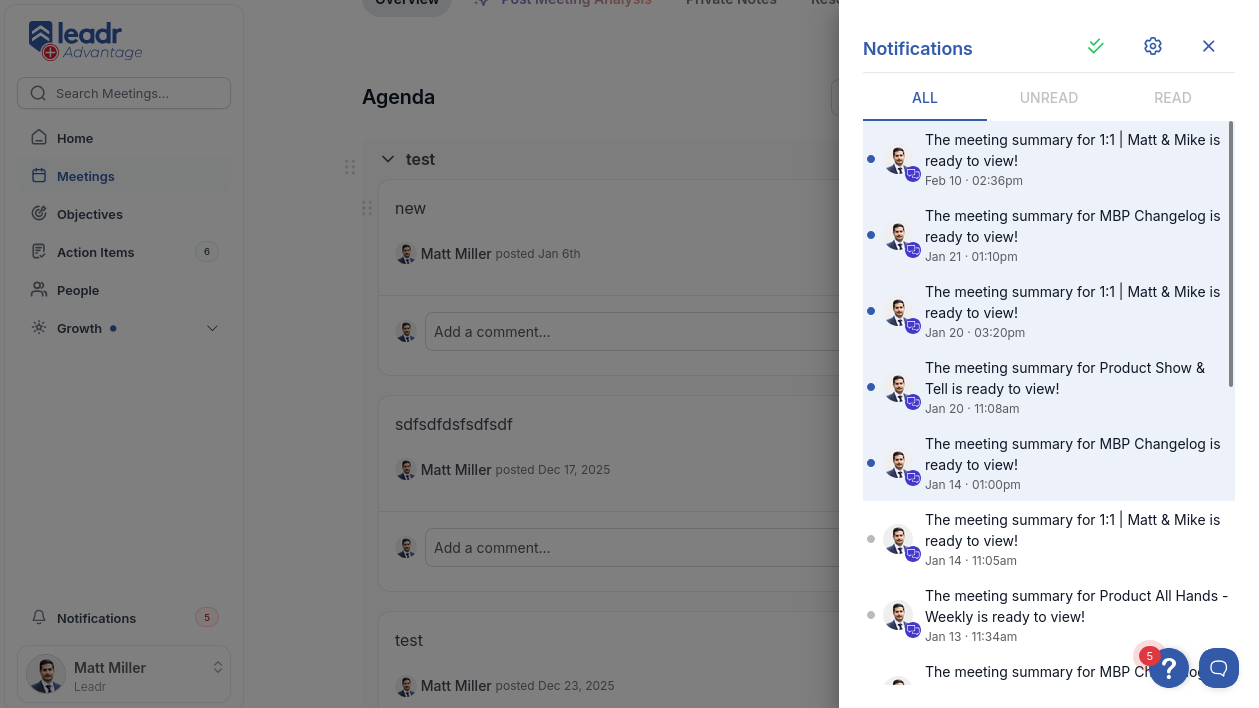
Notification Center
My first feature at Leadr — a notification center that replaced the lack of any in-app notification system. Built it in my first few weeks and it hasn't needed to be touched since.
Architecture
A context provider wraps the app and manages three concurrent data streams via React Query: filtered notifications (based on the active tab), unread notifications (always fetched for mark-all-as-read), and a total unread count for the nav badge.
Notifications live in a slide-out drawer — right-anchored on desktop, bottom-anchored on mobile. Filtering between All, Unread, and Read tabs is handled client-side from the already-fetched data, so tab switches are instant.
Optimistic Updates
Marking notifications as read updates four separate query caches optimistically before the server responds:
- Move items from
unread→readcache - Flip
isReadflags in theallcache - Decrement
totalUnreadcount - Re-sort the read cache by timestamp
All four caches are snapshotted before mutation. If the PATCH fails, everything rolls back to the snapshot automatically.
Polling vs Real-Time
Leadr already uses Ably for real-time features elsewhere, but Ably charges per connection. The unread count polls every 60 seconds instead — good enough for notifications and significantly cheaper at scale. Only the count polls, not the full notification list.
Infinite Scroll
Uses a single IntersectionObserver on the last notification card to trigger fetchNextPage() from React Query's useInfiniteQuery. Pages are 15 items each, flattened into a single array via useMemo. Skeleton loaders are delayed to prevent flashing on fast networks.
Features
- All / Unread / Read tab filtering
- Infinite scroll pagination with IntersectionObserver
- Optimistic mark-as-read with multi-cache rollback
- Unread count badge with 60-second polling
- Click-to-navigate: opens resource, closes drawer, marks as read
- Bulk mark-all-as-read in a single API call
- 11 notification types with icon badges on user avatars
- Responsive drawer (right on desktop, bottom on mobile)
Tech Stack
- React — context provider + component architecture
- React Query — infinite queries, optimistic mutations, cache management
- MUI — drawer, tabs, skeleton loaders
- TypeScript — end-to-end type safety