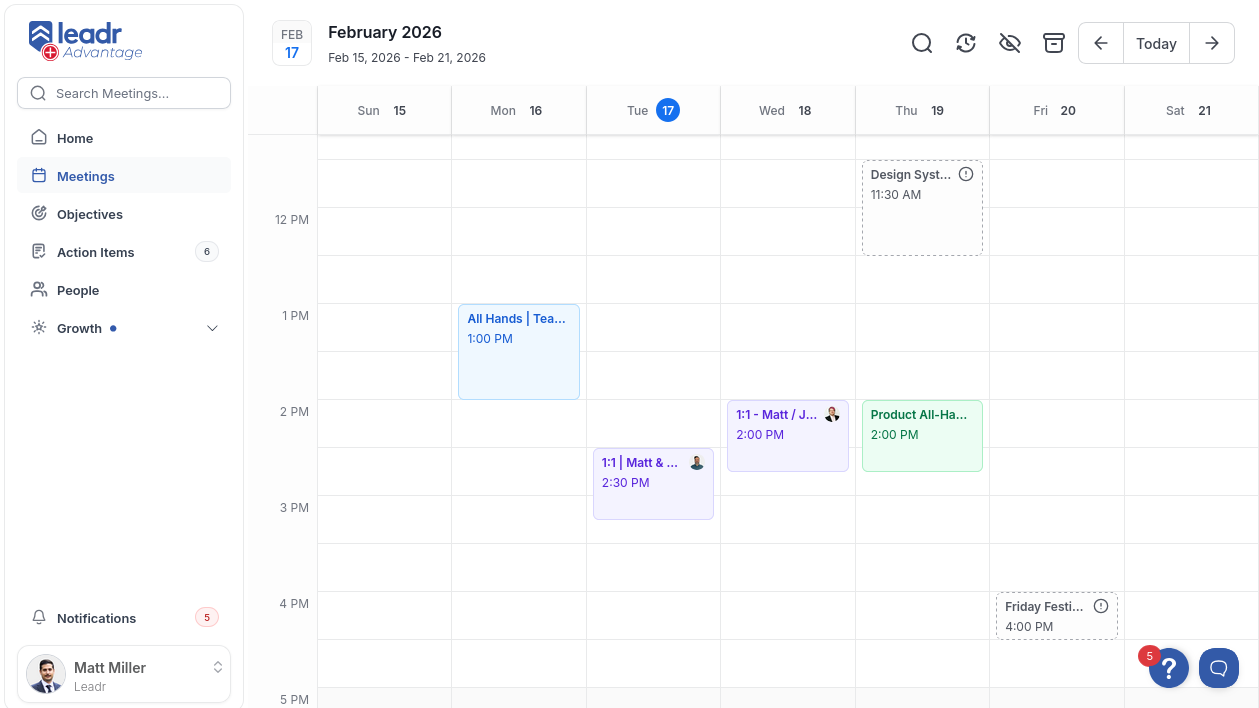
Workweek Calendar
A custom-built weekly calendar view I built for Leadr's meeting platform. The meetings section had no calendar — just a flat list view with cards that showed at most 2 upcoming meetings and hid past meetings unless a series was fully completed. I replaced it with a full workweek calendar with overlap detection, timezone-aware positioning, calendar integration imports, and instant week navigation via prefetching.
The Problem
There was no calendar view at all. Meetings lived in a basic card list that only surfaced up to 2 future meetings and buried past meetings unless their series was marked complete. You couldn't see your week at a glance, couldn't spot scheduling conflicts, and had no spatial sense of when things were happening. We needed something that actually looked and worked like a calendar, tailored to Leadr's meeting workflow and integrated with Nylas calendar sync.
Architecture
Two-layer provider pattern:
- WorkweekProvider — manages navigation state via a reducer (current date, date range, week start day, current time position). Initializes with locale-aware week start (Monday in Europe, Sunday in US) and user timezone.
- WorkweekDataProvider — handles data fetching, calendar auth status, and user permissions. Separates data concerns from UI state so navigation state changes don't trigger data re-fetches unnecessarily.
Overlap Detection
Meetings are grouped by day, then a sweep line algorithm detects time overlaps in O(n) instead of the naive O(n^2) pairwise comparison. Overlapping meetings are rendered side-by-side with calculated widths — up to 3 visible with an overflow popover for the rest.
All meeting timestamps and date strings are pre-computed and cached in a Map to avoid re-parsing dates during grouping and positioning.
Timezone Handling
Every position calculation goes through Intl.DateTimeFormat with the user's configured timezone. Meeting cards are positioned pixel-perfectly on a 48-slot grid (30-minute intervals at 48px per slot) using timezone-aware hour/minute extraction.
Prefetched Navigation
Adjacent weeks (previous and next) are prefetched into React Query's cache with a 5-minute stale time. When the user navigates, the data is already there — navigation feels instant.
Performance
- CSS grid lines — day column grid pattern rendered via
repeating-linear-gradientinstead of 48 individual DOM elements - Custom memo comparators —
DayColumnandMeetingCarduse deep equality checks on meeting IDs and times to prevent unnecessary re-renders - SharedResizeObserver — single observer instance shared across all day columns instead of one per column
- IntersectionObserver on time indicator — stops updating current time position when scrolled out of view
- RequestAnimationFrame — time indicator updates batched through rAF for smooth rendering
Features
- Week and day views with responsive mobile/desktop switching
- Sweep line overlap detection with side-by-side rendering
- Timezone-aware positioning using
Intl.DateTimeFormat - Current time indicator with spring-eased transitions
- Work hours shading (9-5 highlighted, off-hours dimmed)
- Meeting card expansion with inline details
- Nylas calendar import and ignore workflows
- Prefetched adjacent week navigation
- Locale-aware week start day
- Keyboard accessible with ripple feedback
Tech Stack
- React — component architecture with context providers and reducers
- Emotion — CSS-in-JS for dynamic meeting card colors
- React Query — server state, prefetching, and cache management
- TypeScript — end-to-end type safety